Balances
Reading your balances
The Balances tab is the answer to "so who owes who?"

My balances
The top section My Balances is the section that's about you.
- What you're owed — money to come in, because you paid for things other people had.
- What you owe — money going out, because somebody paid for something you had.
There's one row per person, not per expense. Everything you and Paul have between you nets down to a single number, whichever way round it ends up - either you will owe Paul money or Paul will owe you.
Owed by others
Just below is the Owed by others section, which are the debts between everyone else in the trip.
It looks like none of your business, but having full transparency on who owes who is a useful part of settling for a group up.
Don't try to act on this information directly. Tap Settle up in the fewest payments and let Splitiz work the fewest number of payments you all need to make. See Fewest payments.
Picking a trip
Select a Trip from the dropdown at the top to narrow everything to one trip, or shows all your active trips at once. Your default trip as set under the Trips tab is chosen for you.
Everyone's square
When nothing's owed, the balances tab will tell you.
On a solo trip
As there's only you on the trip, nobody owes anybody, so there are no balances to show. You get a running total of what you've spent instead. See Solo trips.
Original and Converted
Two tabs at the top of Balances, and the difference matters as soon as a trip has more than one currency.

Original
Every amount you owe or are owed is shown in the currency it was actually spent in.
Stephen might owe you €6.25 and you owe Stepehn £18.75. Both rows are shown, because those were two different spends in two different currencies.
This view shows all balances in the original currency the bills were paid. Nothing has been converted.
Converted
Everything is converted and added up into one currency, which you pick from the dropdown. Stephen owes you £13.39, one number.
This is the practical view, and the one to use when somebody's about to pay you when you come back from holiday.
Which to trust
Both. They're the same debts.
Converted uses the exchange rate stored on each expense at the time it was added — not today's rate. So the number matches what things actually cost when you bought them.
Why a conversion might be missing
If an expense is created in a currency that your trip has no rate for, it can't be converted and Splitiz will say so rather than guessing at a conversion rate. Add the missing currency in the Trips tab. See More than two currencies.
Where a number came from
Tap any row in Balances and it opens up to show the expenses behind it.

You get every expense that contributed to the balance, what the whole bill was, and what that person's share of it came to.
Click on the Converted tab at the top of the screen before the tapping the row and you'll see all expenses in the same currency.
Use it when somebody queries a number
The fastest way to settle someone saying "that can't be right". Open the row, read the list, and the answer's usually obvious within a couple of lines — a bill somebody forgot they were on, or a dinner they thought they'd already paid for.
What to look for
| It looks wrong because | Check |
|---|---|
| Somebody's share is too big | Were they ticked into a bill they weren't at? |
| Somebody's share is too small | Was Paid ticked for them by mistake? |
| A whole bill is missing | Was it added to the wrong trip? |
| The total is way out | Was the Bill Total entered as somebody's share? |
The last one is the usual culprit. Bill Total is the whole bill, not your or anyone else's part of it — see Adding an expense.
Fixing it
Find the incorrect expense in the Expenses tab and edit it. Balances update the moment you save. See Changing or deleting an expense.
Fewest payments
Six people, a fortnight of bills, and everybody owes everybody something and in different currencies. Tap Settle up in the fewest payments and Splitiz works out the shortest way to square the lot between the entire group in the Trip.

What it does
Twelve small debts often come down to three payments.
If you owe Stephen £20 and Stephen owes Dan £20, there's no reason for two payments — you just pay Dan £20 and all three of you are square. Splitiz finds the fewest number of payment possible between the group no matter how complicated.
It may feel strange paying someone you don't owe, but nobody ends up paying more or receiving less than they should. It's the same money, moved in fewer hops.
Following the plan
You get a list: Carl pays Stephen £99.20, Pay pays Dan £72.43. Work down the list and ensure everyone clicks "I've paid" once they've sent money. Marking a balance as Paid will then keep balances updated so you can see what's outstanding. See Settling up.
Someone can pay person by person while someone else can use fewest payments — Splitiz re-checks each debt as Paid is set, so nobody can pay twice or pay too much. However, mixing payment plans means you may end up making more payments than the fewest payments plan suggested.
One trip at a time
You can see your balances across every trip at once, but settling up has to be done one trip at a time. If All active trips are showing, you'll be asked which trip you're settling before the plan appears.
That's deliberate. It keeps each payment tied to the people who were actually on that trip, so nobody can be paid for a trip they weren't part of, and each trip's balances stay correct.
Currency
You can settle using multiple currencies, but if you pick a single currency to settle in, the same as the Converted tab. Everyone pays in the one currency, that's what makes settling in the fewest payments possible. See Original and Converted.
Nothing to settle
If everyone's already square Splitiz will tell you that no payments need to be made.
Settling up
Splitiz never touches your money. It records who's paid who, and can hand you over to your banking app with the details filled in.
Recording a payment
Tap the person's row in Balances and tell Splitiz the money has changed hands. The balance updates for everyone in the trip.
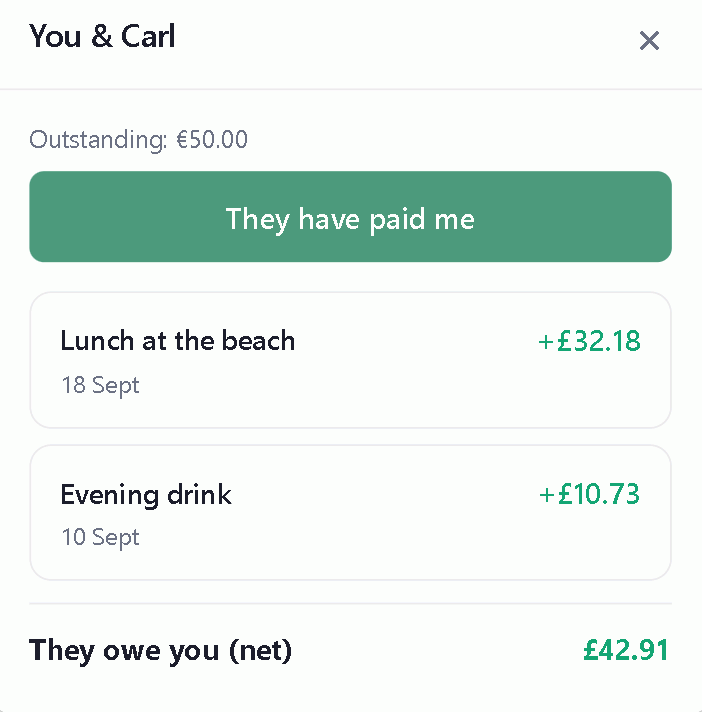
You can record a payment whether you sent it or received it.
The other person confirms
A recorded payment waits for the other person to confirm it. Until they do, it shows as pending on both sides.
That's deliberate — one person saying "I've paid you" isn't the same as the money having arrived, and the gap between the two is where arguments live.
Undoing one a payment
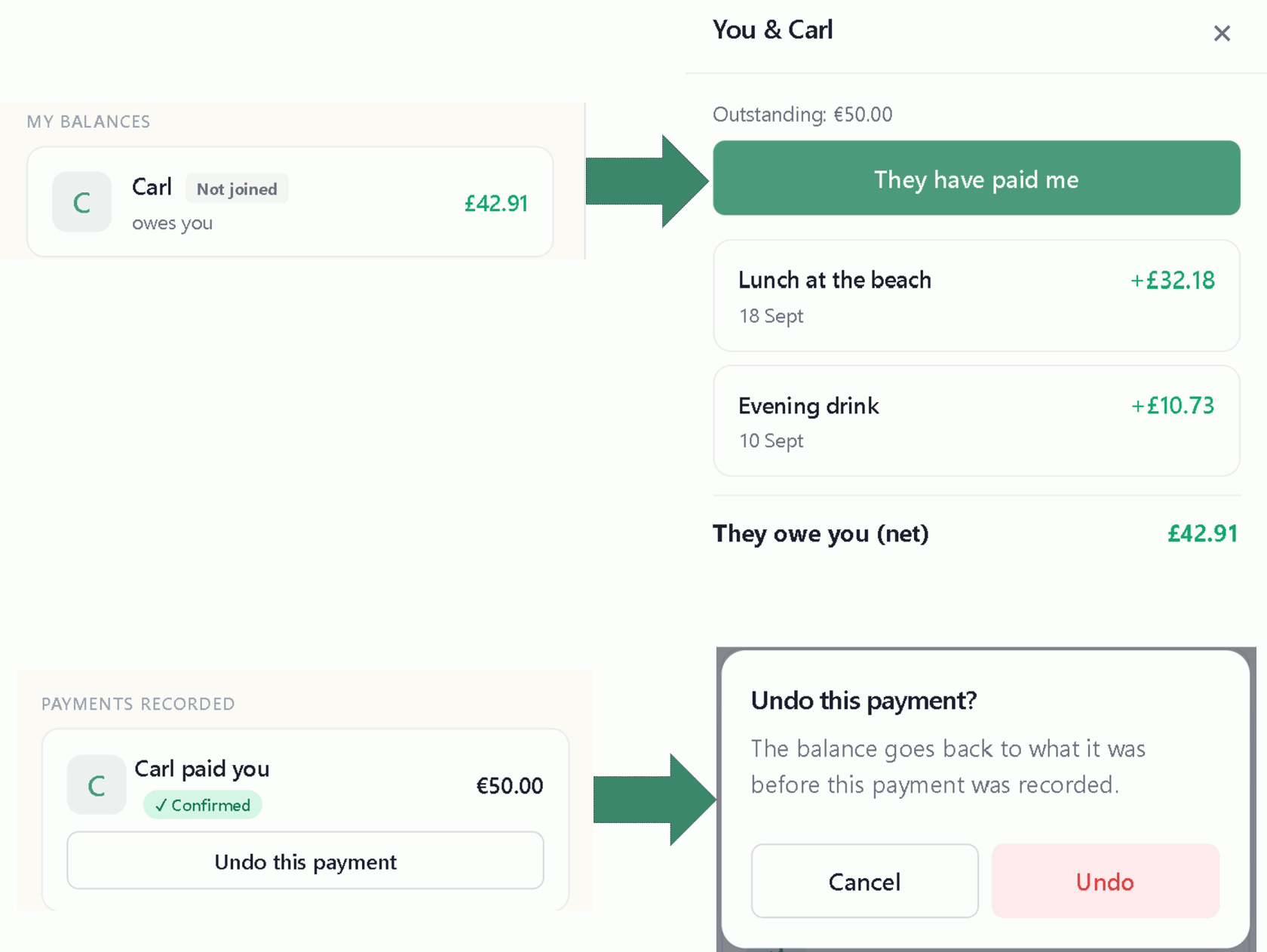
Recorded the wrong balance as Paid? Scroll to the Payments recorded section on the Balances tab to find it. Open it and hit the undo button. The balance goes back exactly as it was. This works whether or not the balance has been confirmed by the other person.
Paying through your bank
If the person you owe has added their payment details in their Account, you'll see a Pay button on their row. It opens Monzo, Revolut or PayPal with details already filled in.

You make the payment through those payment providers, exactly as you normally would. No money moves through Splitiz and no card details are ever held by it.
Only PayPal can carry the amount across from Splitiz. With Monzo and Revolut you have to type it in yourself — Splitiz shows you the figure to type.
To be paid this way yourself, add your details under Getting paid back.
Part payments
Splitiz records a payment in full — there's no way to enter a part payment. If you hand over some of what you owe, either wait until you've paid the rest before recording it as Paid in Splitiz, or settle up and square the difference between you.
Settling a whole group
Use Fewest payments and record each payment as it's made.